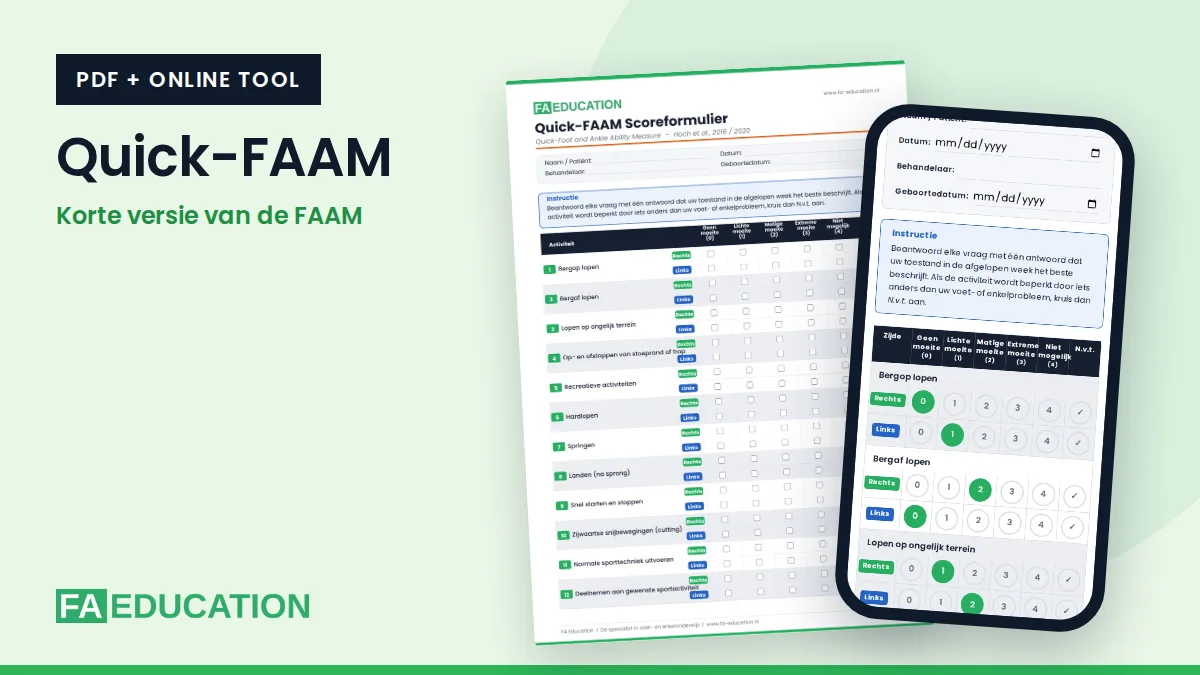
The Quick-FAAM is the short version of the Foot and Ankle Ability Measure. In twelve questions, the patient indicates how much difficulty activities and sport cause. You can download the Quick-FAAM here for free as a PDF, or have it completed online. The score is then calculated instantly.
How does the Quick-FAAM work?
The Quick-FAAM consists of 12 activities, such as walking uphill, walking on uneven ground, running, jumping, landing and starting and stopping quickly. The patient scores each activity separately for right and left, from no difficulty (0) to unable to do (4). If an activity is limited by something other than the foot or ankle, the patient chooses N/A. That item does not count.
The score is a percentage: (maximum score − raw score) ÷ maximum score × 100. A higher score means better function.
Reference values on the form
The form shows the reference values from the study by Hoch and colleagues. A score below 94.79% is consistent with possible chronic ankle instability (CAI). The mean was 74.6% in people with CAI and 96.9% in copers (people who recover from a sprain without developing CAI).
Download or complete online
Complete the Quick-FAAM online (Dutch)Score form (PDF, Dutch)Print-friendly PDF (Dutch)
The online version calculates the score immediately and you can print the result or save it as a PDF. Everything you enter stays on your own device: nothing is sent or stored.
The online version and the PDF are currently available in Dutch. An English version is in preparation.
The Quick-FAAM as an app on your phone
Open the online version on your phone and add the page to your home screen. You can then open the Quick-FAAM with one tap, just like an app. On your first visit on a phone, a short explanation appears once. You can open that explanation again here.
The Quick-FAAM as a shortcut on your computer
Working on a computer? Add the online version as a shortcut on your desktop. You can then open the Quick-FAAM with a double click. First open the online version with the button above and follow the steps for your browser.
- Google Chrome: click the three dots at the top right, choose “Cast, save and share” and then “Create shortcut”. Click “Create”.
- Microsoft Edge: click the three dots at the top right, choose “More tools”, then “Apps” and “Install this site as an app”. In the window that follows, choose a shortcut on the desktop.
- Safari on Mac: click the share icon in the toolbar and choose “Add to Dock”. The shortcut then appears in the Dock.
- Another browser, or it doesn’t work: make your browser window smaller so you can see the desktop. Then drag the icon to the left of the web address onto your desktop.
Sources
Hoch MC, Hoch JM, Houston MN. Development of the Quick-FAAM. Int J Athl Ther Train. 2016;21(4):45-50.
Hoch JM, et al. Continued validation of the Quick-FAAM. Phys Ther Sport. 2020;43:84-88.
Read also
Want to learn more about the foot and ankle?