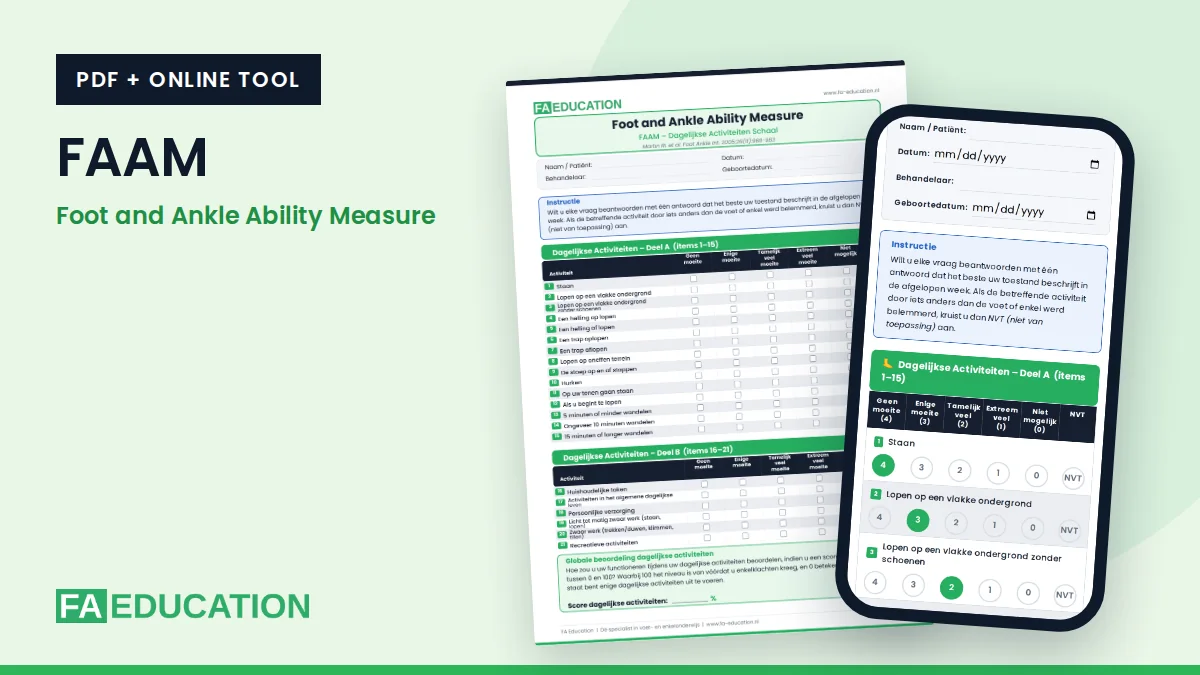
The FAAM questionnaire (Foot and Ankle Ability Measure) shows how much difficulty someone with foot or ankle problems has with daily activities and sport. You can download the questionnaire here for free as a PDF, or have it completed online. The scores are then calculated instantly.
How is the FAAM questionnaire structured?
The FAAM has two subscales: an ADL subscale with 21 items about daily activities and a sport subscale with 8 items. The patient answers each question for the past week, from no difficulty (4 points) to unable to do (0 points). If an activity is limited by something other than the foot or ankle, the patient chooses N/A. That item does not count.
The ADL subscale has a maximum of 84 points and the sport subscale a maximum of 32 points. Both are converted into a percentage. A higher score means better function. In addition, the patient gives an overall rating from 0 to 100 for daily activities and for sport.
With both subscales, the FAAM is one of the two questionnaires within the Ankle-GO.
Download or complete online
Complete the FAAM online (Dutch)Questionnaire (PDF, Dutch)Print-friendly PDF (Dutch)
The online version calculates the score immediately and you can print the result or save it as a PDF. Everything you enter stays on your own device: nothing is sent or stored.
The online version and the PDF are currently available in Dutch. An English version is in preparation.
The FAAM as an app on your phone
Open the online version on your phone and add the page to your home screen. You can then open the FAAM with one tap, just like an app. On your first visit on a phone, a short explanation appears once. You can open that explanation again here.
The FAAM as a shortcut on your computer
Working on a computer? Add the online version as a shortcut on your desktop. You can then open the FAAM with a double click. First open the online version with the button above and follow the steps for your browser.
- Google Chrome: click the three dots at the top right, choose “Cast, save and share” and then “Create shortcut”. Click “Create”.
- Microsoft Edge: click the three dots at the top right, choose “More tools”, then “Apps” and “Install this site as an app”. In the window that follows, choose a shortcut on the desktop.
- Safari on Mac: click the share icon in the toolbar and choose “Add to Dock”. The shortcut then appears in the Dock.
- Another browser, or it doesn’t work: make your browser window smaller so you can see the desktop. Then drag the icon to the left of the web address onto your desktop.
Source
Martin RL, et al. Evidence of validity for the Foot and Ankle Ability Measure (FAAM). Foot Ankle Int. 2005;26(11):968-983. © SAGE Publications.
Read also
Want to learn more about the foot and ankle?